Your script,
ready to shoot.
Open your screenplay and Slugline gives you the breakdown, the shooting schedule, the call sheets and a budget. For Mac and Windows, and your script never gets uploaded anywhere.
macOS 12 or later · Windows 10 and 11, in testing · Final Draft, Fountain and PDF · How to install · What would your script cost to shoot? Find out free
What comes out of your script
The breakdown, by department.
Slugline suggests the elements of every scene, and you correct them.

A schedule that moves.
It groups by location and keeps the nights together. Then you drag the strips where you want them.

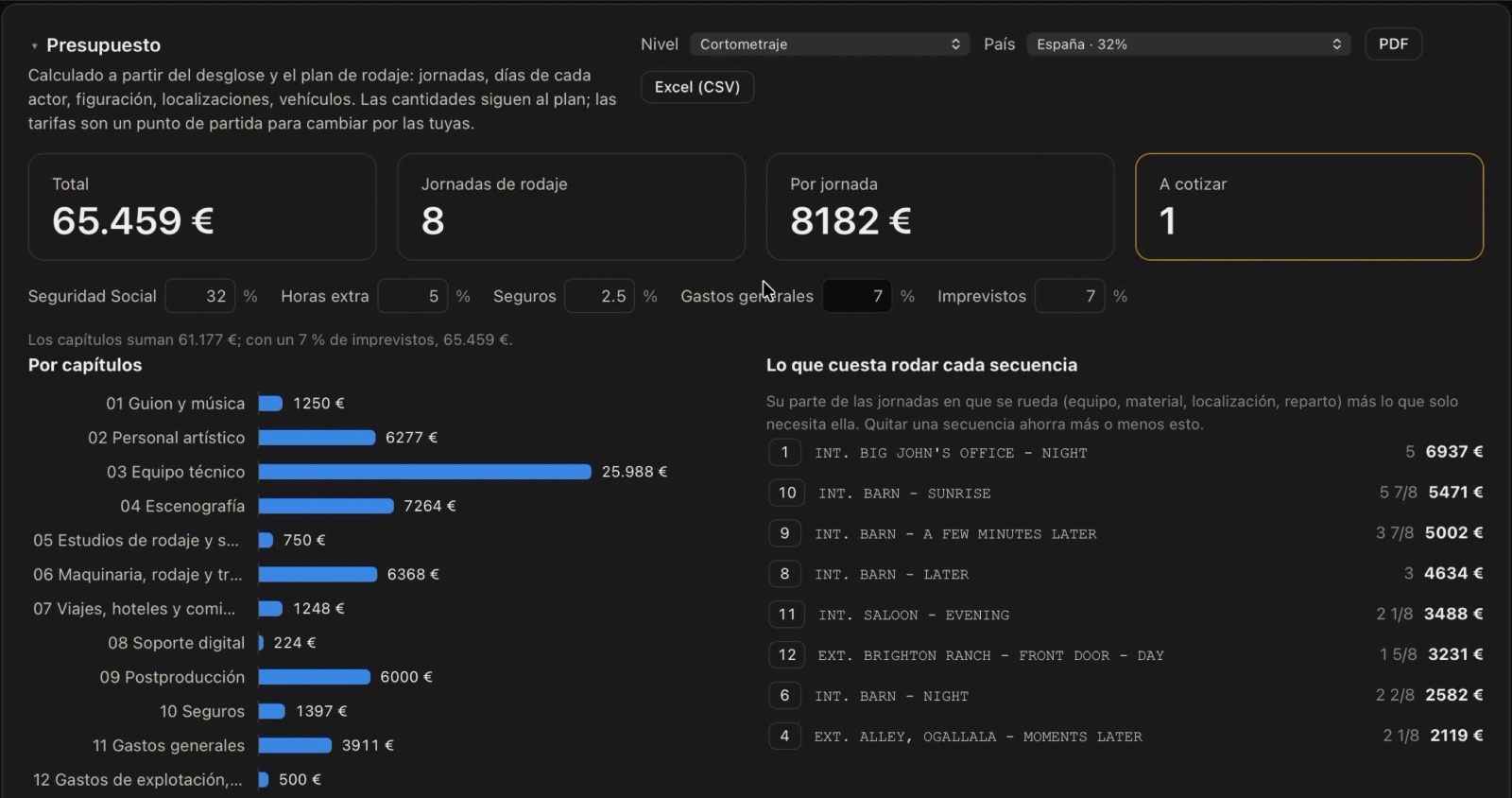
What it costs, scene by scene.
The quantities come from the script and the schedule. The rates are yours.
No internet needed.It all runs on your computer. AI is optional.
Your scripts stay with you.Nothing is uploaded to any server.
Reads what you have.Final Draft, Fountain and PDF, scanned ones too.
Pricing
The trial does everything. It just keeps two scripts, and its PDFs carry a watermark.
Schools and production companies
For the whole school or team, with a one-month trial.
Prices in euros: your card converts them (€59 is about $64, €119 about $129). EU buyers add VAT. Not convinced? Full refund within 14 days. Terms (in Spanish).
FAQ
My Mac says it can't check the app
That's expected: Slugline doesn't carry Apple's developer signature yet. It isn't a virus, and it only happens the first time.
- If the browser blocks the download, choose Keep in the downloads list (or download it with Safari).
- Drag Slugline to Applications, open it once and close the warning.
- In System Settings → Privacy & Security, at the very bottom, click Open Anyway.
Windows says it protected my PC
That's expected: Slugline doesn't carry a developer signature yet. It isn't a virus, and it only happens the first time.
- If the browser warns about the download, choose Keep.
- Open Slugline-Setup.exe. In the blue warning, click More info and then Run anyway.
- Follow the installer. It doesn't ask for an administrator password.
Do I need AI?
No. Without AI the app does everything. With your own Anthropic API key, the breakdown comes out fuller, every scene gets a summary and you can ask questions about the script. You pay for that on your own account, as you use it.
How does the licence work?
You get a key by email, paste it into Settings and that's it. No accounts, no hidden subscriptions.
Is the budget exact?
The quantities are, because they come from the script and the schedule. The rates are a starting point, and what can't be known from a script (effects, fees) is marked to be quoted.
Does it run on Windows?
Yes, on Windows 10 and 11. It's the same app and it reads scanned PDFs too. If anything goes wrong, write to me and I'll fix it.
Which languages?
It reads scripts in English, Spanish and Catalan, and the app and its PDFs come in all three: pick one in Settings.
I'm Vicente Pérez, and I make Slugline. I've tested it on dozens of scripts, but every script is different: if yours doesn't read well, send it to me and I'll fix it.
You're on a phone: Slugline is for Mac and Windows. Open it on your computer, or email yourself the link.
Does your Mac or Windows warn you when you open it? Here's how to open it the first time: on Mac · on Windows.